SEO,CRO

How Better Titles and Meta Descriptions Increase Ecommerce Organic CTR
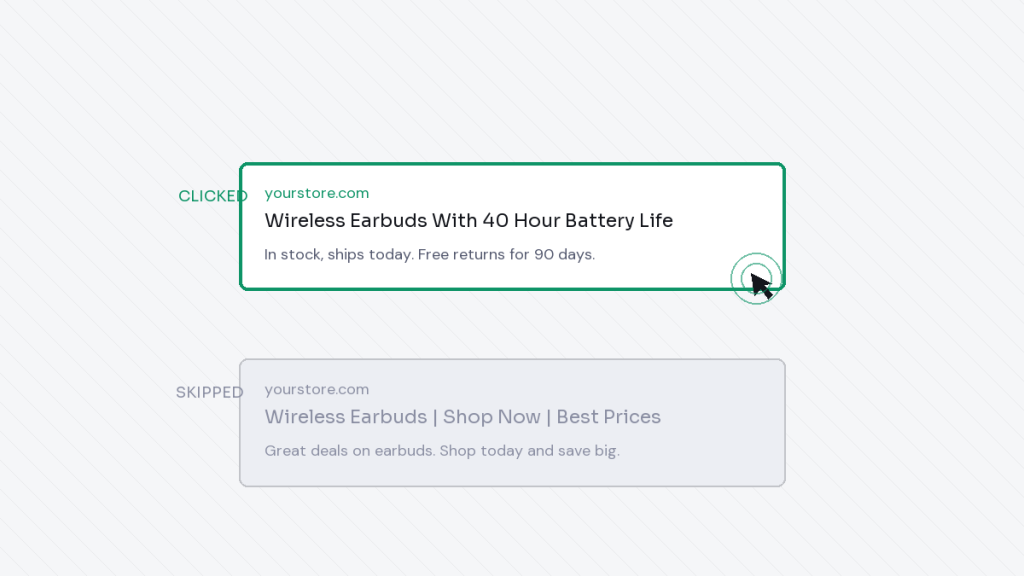
Two stores can rank in the exact same spot on Google.
One gets clicked. One gets skipped.
The difference is usually not the ranking. It is the title and the description sitting under it. Here is the full picture, from what CTR actually means to a step by step way to fix it.
Key takeaways
- Organic CTR is how many people click your result after seeing it.
- A better title often beats a better ranking position.
- Titles and descriptions should answer a real question, not just include keywords.
- Small wording changes can move CTR more than people expect.
What organic CTR actually means
CTR stands for click through rate.
It is the number of people who click your result, divided by the number of people who saw it in search results.
You can find this number for every page on your site inside Search Console, under the performance report.
Two pages can rank in the same position and get very different amounts of traffic, based purely on this one number.
Why this matters more than people think
A page ranking in position five with a strong title can out earn a page ranking in position two with a weak one.
Search engines also appear to watch engagement patterns over time. A title that keeps getting ignored, while others nearby get clicked, may quietly work against that page later, even if it is not a direct, official ranking factor.
So this is not just a small detail. It is one of the highest leverage fixes available on your whole site, and it usually takes minutes, not weeks.
Ranking gets you seen. The title and description decide whether anyone actually cares.
The anatomy of a title that gets clicked
A good title answers one simple question: why should someone click this result instead of the other nine on the page.
That usually means being specific, not generic.
Not “Best Running Shoes,” but “Running Shoes for Flat Feet, Tested on 200 Miles.”
Front load the important part
Titles get cut off past a certain length, roughly 55 to 60 characters depending on the device and font.
Put the most important, specific part first, so it survives the cut off.
Include a real detail, not just a category
A number, a specific use case, or a clear benefit makes a title stand out from ten nearly identical results.
The anatomy of a description that gets clicked
The description backs up the promise made in the title.
It can mention a price, a shipping detail, or a specific benefit the page delivers.
It should sound like a person wrote it, not like a template filled in with keywords, which is covered in more depth in should you still write meta descriptions in 2026.
The psychology behind a click
People do not click because a result exists. They click because it feels like the fastest path to their answer.
Specificity builds trust faster than a broad claim. “60 day returns” beats “great return policy.”
Matching the stage of the search matters too. Someone typing “best running shoes for flat feet” wants a comparison. Someone typing “buy nike pegasus 41” wants a product page, fast, with a price.
Ecommerce specific patterns worth using
Product titles
Include the specific product name, a key attribute, and if it fits naturally, a price signal or availability note.
Category titles
Mention the range or variety available, and a filter or use case shoppers commonly search for, like size or material.
Blog and guide titles
Promise a clear, specific outcome. “How to Choose Running Shoes for Flat Feet” beats “Running Shoe Guide.”
A quick title and description checklist
- Does the title answer a specific question, not a vague topic.
- Does the description add a real detail, not just repeat the title.
- Would you personally click this if you saw it in search results.
- Is every page’s title different, not a copy paste template.
- Does the important part survive if the title gets cut off.
How to test and improve titles, step by step
Step 1: Find the pages worth fixing first
Open Search Console and sort pages by impressions. Look for pages with high impressions but a low click through rate compared to similar pages.
Step 2: Rewrite the title with one clear improvement
Add a specific detail, front load the important part, or fix a mismatch between the title and what the page actually offers.
Step 3: Note the date and current CTR
Write down the current click through rate and the date you made the change, so you have something to compare against later.
Step 4: Wait, then compare
Give it a few weeks. Search engines need time to show the new title consistently and gather fresh click data.
Step 5: Move to the next page
Do not try to rewrite everything at once. Fix your highest opportunity pages first, confirm the change works, then repeat.
Tools that make this easier
RankMath shows a live preview of your title and description while you edit, so you can see roughly how it will appear in search results.
Search Console remains the most reliable source for real click through rate data, since it reflects actual searcher behavior, not a guess.
Common mistakes to avoid
Writing a title that promises something the page does not actually deliver. This increases clicks briefly, then increases people leaving immediately, which helps nobody.
Using the exact same title format across every single product, so nothing stands out.
Writing titles in all capital letters or stuffing them with symbols, which often looks like spam rather than a real result.
Ignoring how the title looks on mobile, where less text fits before it gets cut off.
Frequently asked questions
Is CTR an official Google ranking factor
Google has not confirmed it as a direct ranking factor. Even so, strong CTR correlates with more traffic and stronger engagement signals, which matter for growth regardless of the exact mechanism.
How long should I wait before judging a title change
A few weeks is usually enough to see a meaningful pattern, especially for pages with decent search volume already.
Should I rewrite titles on my best performing pages too
Be cautious there. If a page already performs well, test carefully rather than changing a title that is already working.
What is the fastest win for most stores
Fixing titles on pages with high impressions and low CTR. These pages are already being seen. A better title is often the fastest way to turn that visibility into actual traffic.
The short version
A ranking gets you in front of someone. The title and description decide if they walk through the door.
Fix the wording before you chase a better ranking. It is usually the faster win, and it compounds every single day the page keeps showing up in search.
Dhanik
I build the automation and marketing systems that let ecommerce brands grow without adding more manual work: email and SMS flows, workflow automation, reporting, and the content and SEO that feeds all of it. Currently building these systems at TechDeliveryPartners, after four years running SEO and content at KonixWeb, and seven years total in search and digital marketing.
View full profile