Automation

Zapier or Make: Choosing the Right Automation Tool for Your Ecommerce Store
Most ecommerce brands eventually hit the same wall.
Someone is copying order data into a spreadsheet by hand. Someone is updating a CRM record every time a customer buys. That is the moment to bring in Zapier or Make.
The harder question is which one, and most of the advice online just lists features instead of actually answering it. This guide walks through the real differences, when to pick each, and how to avoid the most common automation mistakes.
Key takeaways
- Zapier suits simple, linear workflows and teams without a dedicated automation owner.
- Make suits branching logic, multiple data sources, and higher operation volume.
- Map the workflow on paper before opening either tool.
- Start with the simplest version and add complexity only when a real bottleneck appears.
- Plenty of stores end up using both, for different jobs.
Why ecommerce stores need workflow automation at all
Every manual task someone does more than once a week is a candidate for automation.
Copying order details, updating inventory counts across two systems, adding new subscribers to a list, notifying a team when a high value order comes in. None of this needs a person doing it by hand forever.
The cost is not just time. It is the errors that creep in when a tired person copies numbers by hand at the end of a long day.
They solve the same problem differently
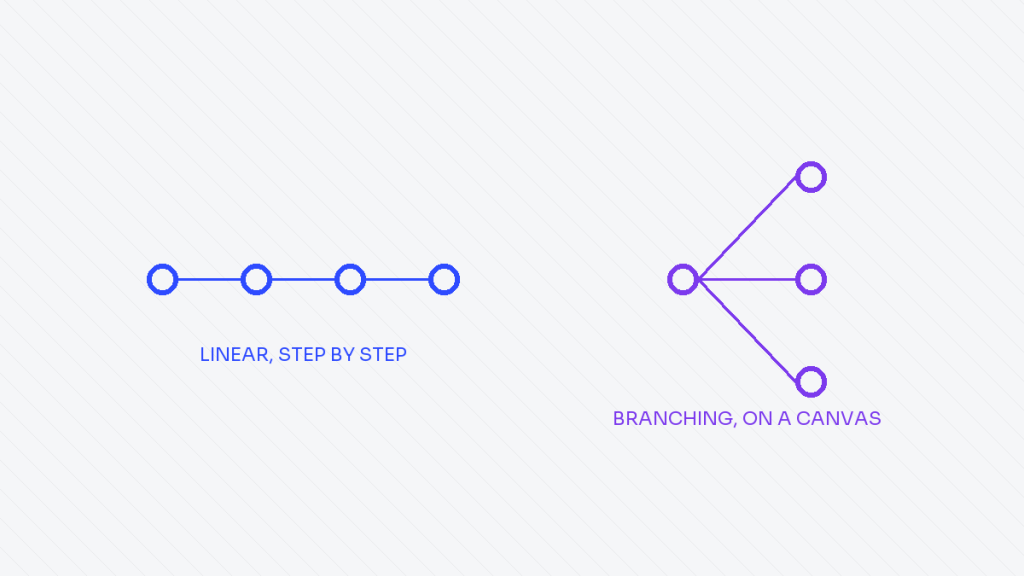
Zapier thinks in single steps. One trigger, one or more actions, built fast and read easily by anyone on the team.
Open a Zap and you can tell what it does in about ten seconds. Make thinks in visual flows, branches, and modules on a canvas, closer to a diagram than a form.
Open a Make scenario and you are looking at something closer to a flowchart, with logic that can split, loop, and merge in ways a simple linear tool cannot represent.
Both move data between your store, your email platform, your spreadsheet, and your CRM. Both can trigger on a new order, a new subscriber, or a support ticket. The difference does not show up in a simple one step workflow. It shows up once the workflow gets complicated.
When Zapier is the right call
Simple, linear workflows: a new order creates a row in a spreadsheet, a new subscriber gets added to a segment, a support ticket posts a message to a channel.
Zapier is faster to build, easier to hand off to a non technical teammate, and cheaper at low volume. If the person who needs to maintain the workflow six months from now is not an automation specialist, that alone can be reason enough to choose it.
Zapier also tends to have the deepest and most reliable integrations for mainstream tools. If the stack is mostly well known platforms, Shopify, Klaviyo, Google Sheets, Slack, the connections are usually well maintained and well documented.
When Make is the right call
Anything with branching logic, loops, or multiple data sources feeding one workflow.
A workflow that needs to check a customer’s order history before deciding which email to trigger is far easier to build and debug on Make’s canvas than as a chain of separate Zaps.
Make also handles higher operation volume more affordably once a store is processing real order numbers. The visual canvas also makes it easier to debug a workflow that touches five or six tools instead of two, since you can see exactly where data stalled or an error happened, module by module.
A concrete example
Picture a workflow that needs to check whether a new order is a first time customer, look up their signup source, and route them into one of three different welcome sequences depending on that source.
In Zapier, this needs several linked Zaps with filters chained together, which gets fragile fast. In Make, it is one scenario with a router module and three branches, visible on one screen, easy to trace when something goes wrong.
The tool is not the strategy. Map the workflow on paper first, then pick whichever tool draws that map with the fewest extra steps.
A mistake worth avoiding
The most common mistake is picking the tool before mapping the workflow.
Someone learns Zapier first, so every automation gets forced into single linear steps even when the actual problem has three branching conditions. Or someone falls in love with Make’s canvas and builds an elaborate scenario for a task that was always going to be one trigger and one action.
Spend ten minutes sketching the workflow on paper before opening either tool. List the trigger, the conditions, and every system the data needs to touch. That sketch usually makes the right tool obvious.
Questions to answer before building
- Does this workflow branch, or does it run the same way every time.
- How many separate tools does the data need to pass through.
- Who is maintaining this in six months, and how technical are they.
- What is the expected monthly volume, and does pricing hold up at that volume.
Running both without doubling the maintenance
Plenty of stores end up running both tools at once, Zapier for the simple, high trust connections and Make for the handful of workflows that genuinely need branching logic.
That is not a compromise. It is usually the right setup. The mistake is not using two tools, it is using the wrong one for a given job because it happened to be the one already open.
Whatever gets built, document it somewhere outside the tool itself, even a single page listing what triggers what and why. The workflow will make perfect sense the day it is built and completely lose that context a year later when it needs a fix.
Frequently asked questions
Can I switch from Zapier to Make later without starting over
Mostly yes, though workflows need to be rebuilt rather than imported directly. Keeping a simple written map of each workflow makes switching tools much faster later.
Which tool is cheaper for a small store
Zapier is usually cheaper and simpler at low volume. Make tends to become more cost effective as operation volume grows, especially with branching workflows.
Do I need a developer to use either tool
No. Both are built for non developers, though Make has a steeper learning curve because of its visual, branching interface.
What is the biggest automation mistake ecommerce stores make
Automating a broken process instead of fixing it first. Automation speeds up whatever process you give it, including a bad one.
A simple way to decide
If someone on the team who is not technical needs to open and understand the automation later, start with Zapier.
If the workflow branches more than twice or pulls from more than two tools, start with Make. Either way, build the simplest version first and add complexity only when a real bottleneck shows up.
Automation built ahead of an actual need tends to become the thing nobody remembers how to maintain a year later.
Dhanik
I build the automation and marketing systems that let ecommerce brands grow without adding more manual work: email and SMS flows, workflow automation, reporting, and the content and SEO that feeds all of it. Currently building these systems at TechDeliveryPartners, after four years running SEO and content at KonixWeb, and seven years total in search and digital marketing.
View full profile